Documentation
Simulation summary guide
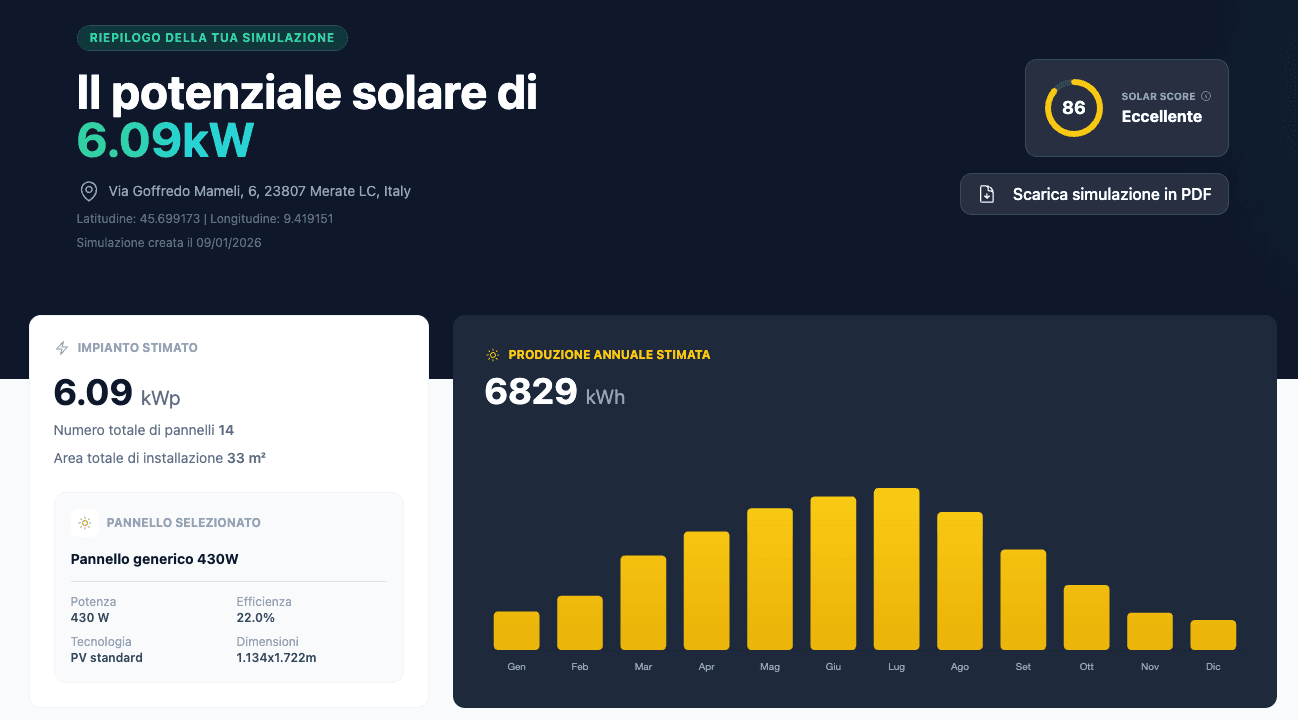
The Simulation Recap is the heart of the user experience on Sunnix: an interactive environment (playground) where data calculated by the algorithm is presented in graphical and tabular form.
Access & Data Privacy
Simulations are temporary. Here is how links and saving work.
- Unique link
- Every simulation lives on a public but secret URL (not indexed on Google). Perfect for sharing on WhatsApp or via Email with clients, friends, or family.
- Simulation expiration
- 48 Hours (Standard) After 2 days of inactivity, the link expires and data is deleted. 30 Days (Extension) If you send a request (e.g., quote), we save data for a month.
- Local Save
- Your estimates are saved in the browser of the device where you perform them and are recoverable by going to the 'your estimates' section in the top menu of every page, or clicking here. If you switch computer or phone, you won't see them in history (unless you use the direct link).
Beware of volatile data
Technical and Production Analysis
This section is always visible and shows the energy yield of the simulated system, plus an environmental analysis estimate.
- Production Graphs
- Visualization of estimated production in kWh on a monthly basis.
- Environmental Analysis
- Calculation of ecological impact, expressed in Tons of CO₂ saved and equivalent trees planted.
- of CO₂/year not emitted
- By avoiding these emissions you contribute to cleaner air.
- equivalent trees/year
- This many would be needed to absorb the same CO₂ every year.
Estimate based on 0.20 kg of CO₂ avoided per kWh produced and 22 kg absorbed by one tree in a year.
Economic and Component Analysis
If the chosen module has a price, you will unlock the full economic simulation based on market values (see Price Transparency).
- Automatic Hardware
- The algorithm composes the base 'package': Inverter: A model with adequate power (peak/nominal) is automatically selected and quoted.
- Storage (Optional)
- The system suggests the ideal size, but you can modify or remove it.
- Services and Bureaucracy
- You can include Installation and Paperwork based on your needs.
- Electric Mobility
- Activate the EV option to calculate energy needs including cars, and see if production would be enough to charge them based on km traveled.
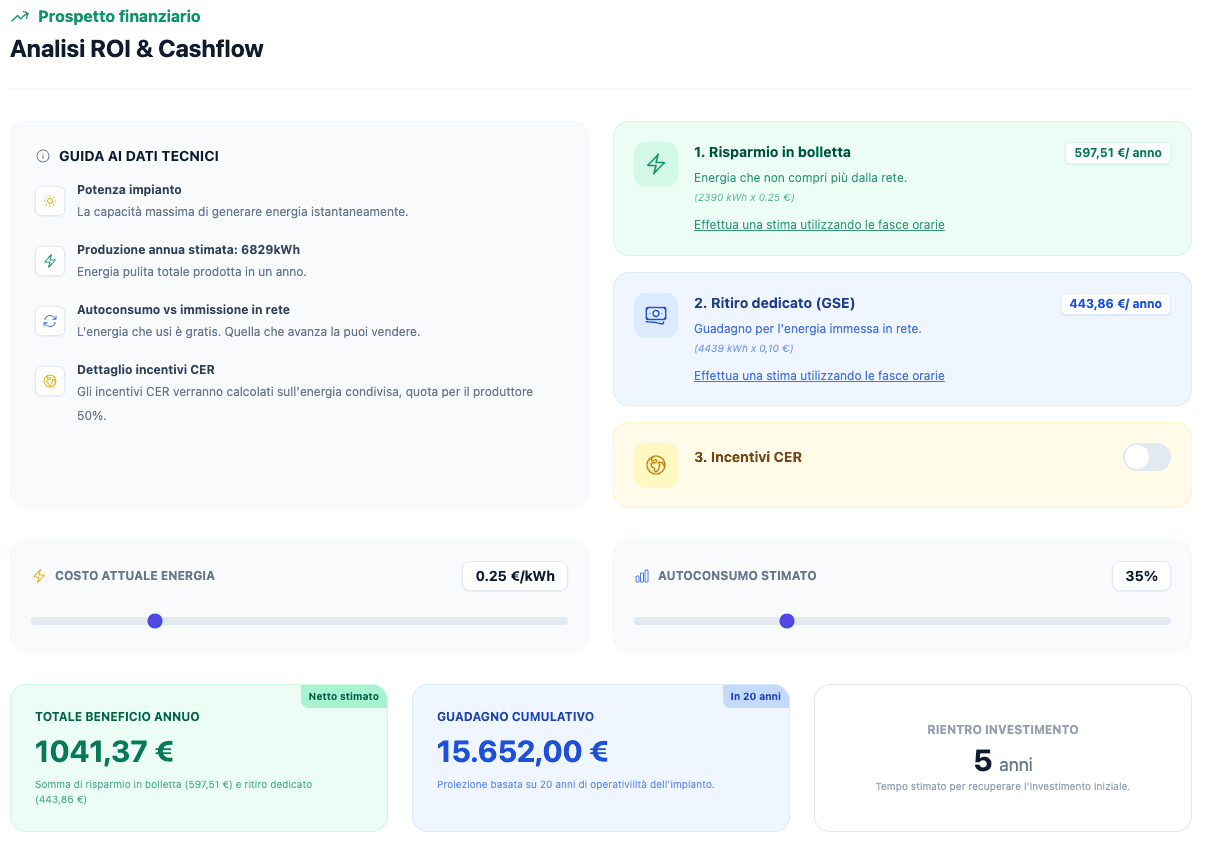
Interactive Financial Analysis
This is the decision area, where the user can test investment sustainability in real-time.
- ROI (Return on Investment)
- Estimated time to recover expenses (e.g., 4.5 years).
- Bill Savings
- Annual and twenty-year estimate of direct savings.
- Energy Value
- Estimated revenue from Dedicated Withdrawal (sold energy) and REC incentives.
- Self-consumption Slider (%)
- Varies the percentage of instantly consumed energy.
- Current Energy Cost
- Enter the real cost paid today in your bill (€/kWh).
- Tax Incentives
- Select deductions (e.g., 50% Bonus) from the database to recalculate the plan.
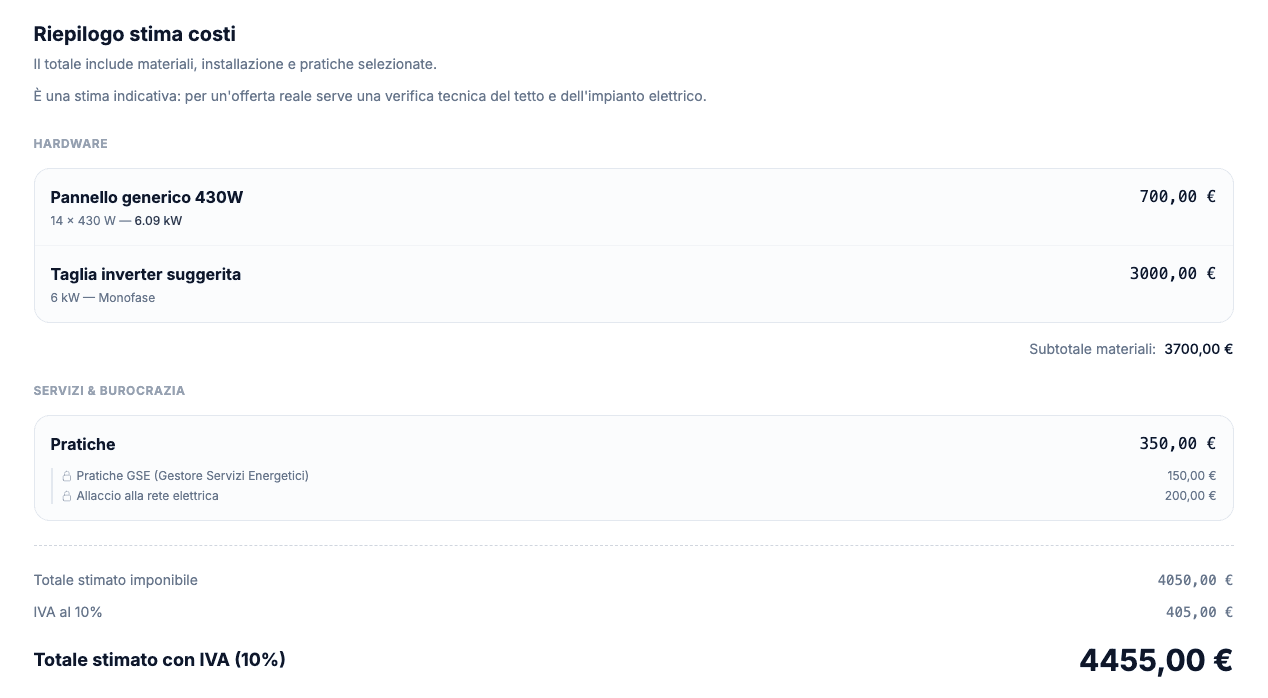
Price Detail and Financing
Clicking on View details in the price modal opens an in-depth modal window where you can view all cost estimates:
Financing Simulator
Export and Next Steps
At the end of the configuration, the user has several options to concretize the simulation.
- Download PDF
- Dynamic professional report reflecting exactly the selected options.
- Direct Contact
- Direct contact form to the panel manufacturer (in case a panel present in the Sunnix database was selected).
Try the experience
See an example simulation
Explore a pre-filled report to see all features in action and understand how to customize your simulation.
Open DemoEstimated time: 30 seconds
Ready to find out what your roof could do?
Nothing else needed. Enter your data and immediately get the full report of your system.
No registration required